|
|
WAVLINK Multi TB4/5 Laptop Docking Station Thunderbolt 5 Dock Dual HDMI DP 140W For Sale

When you click on links to various merchants on this site and make a purchase, this can result in this site earning a commission. Affiliate programs and affiliations include, but are not limited to, the eBay Partner Network.

WAVLINK Multi TB4/5 Laptop Docking Station Thunderbolt 5 Dock Dual HDMI DP 140W:
$161.99
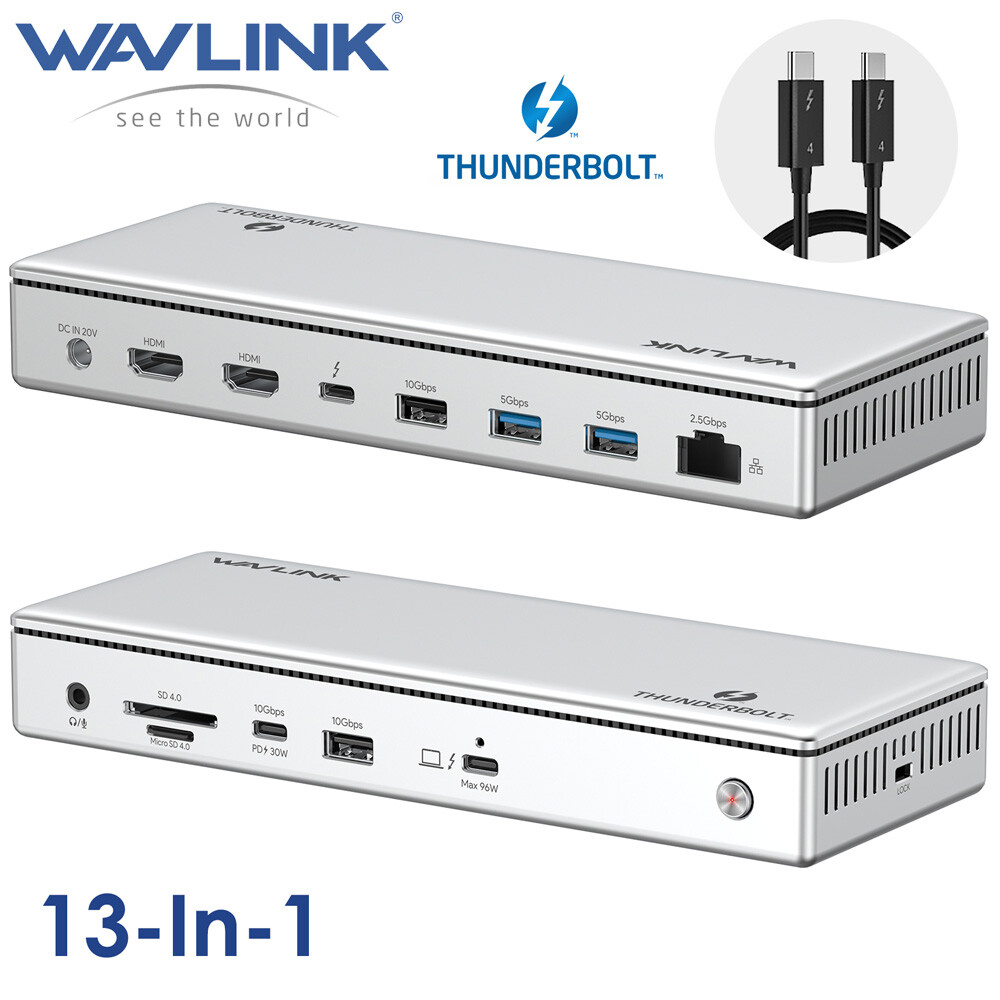
WAVLINK Thunderbolt Docking Stations Created with Eselt - Templates WAVLINKThunderbolt Docks WAVLINK Thunderbolt Docking Stations — Choose the Right Model for Your Setup Purchase Recommendations Your choice depends on your laptop's port, the number of displays you need, and whether you are willing to use a driver‑based solution. ModelKey PortsHost ChargingMax Displays (Windows)Driver RequiredBest ForWL‑UTD45 (TB4)1x TBT4 downstream, 2x HDMI, 4x USB-A, 2.5G RJ45, SD/TF, Audio96W (160W adapter)Triple 4K@60Hz or Single 8K@60HzNo (native)Most TB4 users (1‑3 displays)WL‑UTD41 Pro (TB4)3x TBT4 downstream, 2x HDMI, 2x DP, 4x USB-A, 2.5G RJ45, SD, Audio98W (200W adapter)Quad 4K@60Hz (DisplayLink)Yes (DisplayLink)Quad‑display productivity (no HDCP)WL‑UTD59 (TB5)3x TBT5 downstream, 4x USB-A 10G, 2.5G RJ45, SD/TF, Audio140WTriple 4K@144Hz or Dual 8K@60HzNo (native)TB5 laptops / future‑proofWL‑UTD58 (TB5, Intel‑certified)3x TBT5 downstream, 4x USB-A 10G, 2.5G RJ45, SD/TF, Audio140WTriple 4K@144Hz or Dual 8K@60HzNo (native)TB5 with Intel certificationRecommendation (TB4/2xHDMI/4xUSB A/96W PD/RJ45/SD/TF/MIC) – For most Thunderbolt 4 users (1‑3 displays) Choose A (WL‑UTD45) if you have a TB4 laptop and want a simple plug‑and‑play dock. It delivers 96W charging, SD/TF slots, 2.5GbE, and native video output without extra drivers.
Keep in mind: On M1/M2 Macs, only one external display is supported; M3 Macs can do dual displays only with the lid closed. On Mac, using both HDMI ports will mirror the same content. Recommendation (3xTB4/2xHDMI/2xDP/4xUSB A/98W PD/RJ45/SD/audio) – For 4‑display setups Choose C (WL‑UTD41Pro) only if you absolutely need four external 4K monitors. It is the only model that supports quad displays, but it requires the DisplayLink driver and does not support HDCP (so streaming services like Netflix may not work). It is fine for productivity work but not for gaming or low‑latency tasks. Recommendation (3xTB5/140W PD/4xUSB A 3.2/2.5G RJ45/SD/TF/Audio) – For Thunderbolt 5 laptops or future‑proofing Choose D (WL‑UTD58) or WL‑UTD59 if it costs less – if you own a Thunderbolt 5 laptop or plan to upgrade soon. These offer the highest video performance (single 8K@144Hz, triple 4K@144Hz), 140W host charging, and 80 Gbps bandwidth. WL‑UTD58 is Intel‑certified, which gives extra peace of mind for stability and compatibility, while WL‑UTD59 is functionally identical. Special advice for Mac users - Base M1/M2 Macs can only drive one external display natively, regardless of TB4 or TB5. If you need more, you must use a DisplayLink‑based dock (like WL‑UTD41Pro), but expect some performance overhead.
- M1/M2/M3 Pro/Max and M4 series can drive dual 6K@60Hz through the TB5 docks (WL‑UTD59 or WL‑UTD58) – this is the best experience for Mac professionals.
- For simple single‑display office work on a Mac, WL‑UTD45 is the most cost‑effective.
WAVLINK Thunderbolt 4 Docking Station, Single 8K, Triple 4K Display, 13 In 1 Laptop Dock for TBT 4/3 Mac & TBT 4 Windows PC, 40 Gbps with Max 96W Charging for Laptop with 2.5G RJ45 - 💼13-in-1 Thunderbolt 4 Dock: Turn your laptop's Thunderbolt 4 port into a versatile hub with 1x Thunderbolt 4 downstream (8K, 40Gbps, 15W), 2x 8K HDMI ports, Thunderbolt 4 host, USB-C PD port (10Gbps, PD 30W), 4 USB-A ports, 2.5G Ethernet port, SD/TF card slots, and a 4-pole phone jack—all in one dock. Note: Using two HDMI ports for multiple displays on Mac will show mirrored content.
- 💻Single 8K Display & Multiple 4K Displays: The Thunderbolt 4 dock supports an impressive single 8K display or multiple 4K displays (dual, triple display), providing stunning visuals and enhancing productivity. You can effortlessly switch between extend and mirror modes to customize your workflow. Please note: M1/M2 based Macs only support single monitor; For M3 based Macs, pls close the host screen to support dual display.
- 🔋40Gbps Transfer & Sufficient 96W Charging: Experience rapid 40 Gbps data transfers with Thunderbolt 4. The upstream port delivers up to 96W power using a robust 160W adapter for efficient laptop charging. For multiple device charging, the downstream Thunderbolt 4 and USB-C PD ports offer 15W and PD 30W respectively. Say goodbye to any low battery situation.
- 🚀2.5G Ethernet & Super-Speed Transfer: Whether you're streaming, gaming, or working on bandwidth-intensive tasks, the 2.5G wired connection ensures a seamless online experience. Enjoy quick file transfers with USB-A/USB-C 10Gbps ports, perfect for connecting external hard drives and USB devices. The SD/TF card slots offer fast transfer speeds of up to 312 MB/s, ideal for photographers, designers, and filmmakers to store their work effortlessly.
- 🌐Wide Compatibility: Plug and play for Thunderbolt 4 PC running Windows 10/11, Thunderbolt 3/4 Mac running Mac OS 11 or later, and other USB4 and MFDP hosts (full-functional USB-C, supports DisplayPort+USB3.1+Power Delivery). Just enjoy seamless connectivity and enhanced functionality on your PC or Mac with this Thunderbolt 4 docking station.
Windows Unleashes 8K Brilliance: Dive into breathtaking 8K visuals on Windows with a single display setup. *MacBook limits to 4K@60Hz in single display mode due to hardware constraints. Blazing 40Gbps TBT4 Speeds: Harness the power of the Thunderbolt 4 interface for lightning-fast data transfers at an impressive 40Gbps, ensuring seamless connectivity. Single/Multi-4K Display: Enjoy crisp triple 4K@60Hz visuals in single or multiple display modes both on Windows and Mac OS, enhancing your viewing experience. Versatile Charging Options: Keep your devices juiced up efficiently with 96W host charging, 30W USB-C PD charging, and 15W TBT4 charging, backed by our powerful 160W adapter. High-Speed Connectivity: Utilize the 2 USB-A 10Gbps and one USB-C 10Gbps ports for lightning-fast file transfers, enabling swift and efficient data transmission within seconds. Photography Hub: Capture your moments and transfer them swiftly at up to 312 MB/s using the SD/TF card slots. Seamlessly edit and store your memories for a lifetime. Enhanced Networking: Experience high-speed wired networking with the 2.5G Ethernet port ensuring stable and fast connectivity. Backwards compatible with 1000/100/10Mbps speeds. Premium Audio Integration: Enjoy optimal audio experiences with a 3.5mm headphone jack, providing versatile audio connectivity options for listening, speaking, or recording tasks. Considerate Designs - 🔒 Supports Kensington lock for securing devices and data.
- ⚫ ON/OFF power button for quick operation control.
- 🚫 Stay steady and stable with anti-slip pads for added grip.
- 💡 Power LED indicator keeps track of your device's status.
- 🌀 Strategically placed ventilation holes enhance airflow and cooling.
Compatible Systems - Thunderbolt 4 PC running Windows 10/11.
- Thunderbolt 3/4 Mac running Mac OS 11 or later.
- Compatible with Other USB4 and MFDP Hosts (Full-functional USB-C, supports DisplayPort+USB3.1+Power Delivery)
Multiple Display Resolution (Max. Resolution) - a. For Mac OS TBT3/TBT4:
1) Single Display: TBT4/HDMI1/HDMI2: 4K@60Hz;
2) Dual Display: TBT4+HDMI1/2: 4K@60Hz(ABC); HDMI1+HDMI2: 4K@60Hz(ACC);
3) Triple Display: TBT4+HDMI1+HDMI2: 4K@60Hz(ABCC). - b. For Windows TBT4 PC (DP1.4 with DSC):
1) Single Display: TBT4/HDMI1/HDMI2: 8K@60Hz;
2) Dual Display: TBT4+HDMI1/2: 4K@60Hz; HDMI1+HDMI2: 4K@60Hz;
3) Triple Display: TBT4+HDMI1+HDMI2: 4K@60Hz. - c. For Windows USB-C MFDP PC (DP1.4 with DSC):
1) Single Display: TBT4/HDMI1/HDMI2: 8K@30Hz;
2) Dual Display: TBT4+HDMI1/2: 4K@60Hz; HDMI1+HDMI2: 4K@60Hz;
3) Triple Display: TBT4+HDMI1+HDMI2: 4K@30Hz.
Specification - Model: WL-UTD45
- Ports: Front: 1x 4-Pole Phone Jack; SD/TF Card Slots(312MB/s), 1x USB-C(10Gbps, PD 30W), 1x USB-A 10Gbps, 1x Thunderbolt 4 Host(40Gbps, 96W);
Rear: 1x DC IN (20V/8A, 160W); 2x 8K HDMI; 1x Thunderbolt 4 Downstream(8K, 40Gbps, 15W); 1x USB-A 10Gbps; 2x USB-A 5Gbps; 1x RJ45(2500Mbps). - Unit Size: 217.7 x 83.1 x 31.1mm / 8.6 x 3.3 x 1.2in (WxDxH)
- Thunderbolt 4 Cable Length: 80cm / 31.5in
- Power Adapter Cable Length (plug end): 150cm / 59in
- Power Adapter Cable Length (round port end): 120cm / 47in
- Unit Weight: 545g / 19.2oz
- Housing Material: ABS+Aluminum Alloy
Warm Tips - 1. M1/M2 based Macs only support single monitor.
- 2. For M3-based Macs, pls close the host screen to support dual display.
- 3. Using two HDMI ports for multiple displays on Mac will show mirrored content.
- 4. Single 8K@60Hz is enabled for Windows TBT4 PC with DP 1.4 or higher and DSC.
- 5. MacBook limits to 4K@60Hz in single/dual/triple display mode due to hardware constraints.
- 6. Performance may be limited for non-Thunderbolt 4 systems.
- 7. The downstream Thunderbolt 4 port and the USB-C PD port support offline charging. Devices can be charged when disconnected from the computer or when the computer is powered off.
In the Box - 1 x Thunderbolt 4 Triple Display Docking Station
- 1 x 0.8M Thunderbolt 4 Cable
- 1 x 160W Power Adapter
- 1 x AC Power Cable
- 1 x Cable Holder
- 1 x Quick Start Guide
3xTB5/140W PD/4xUSB A 3.2/2.5G RJ45/SD/TF/Audio (WL-UTD59) WAVLINK Thunderbolt 5 Dock, 12-in-1 Hub with up to 120Gbps, MAX 140W PD, Triple 4K/Dual 8K Display, 3x TB5 Downstream Ports, 4x USB-A 10Gbps, 2.5G Ethernet, for Mac & Windows TB5/4 Laptops - Next-Gen Thunderbolt 5 Speed: Experience the future of connectivity with up to 120Gbps dynamic bandwidth. This dock leverages the full power of Thunderbolt 5, providing 80Gbps bi-directional speed and Bandwidth Boost for unparalleled performance with high-resolution displays and data-intensive tasks.
- Stunning Multi-Monitor Displays: Drive up to Triple 4K displays on compatible Windows PCs with Thunderbolt 5, or up to Dual 6K displays on supported Mac models (M1/M2/M3 Pro/Max, M4 All models). This dock unlocks your laptop's full visual potential for ultimate productivity.
- MAX 140W Power Delivery: Power and charge your high-performance laptop with up to 140W via a single Thunderbolt 5 cable. This dock also keeps your peripherals charged with three downstream Thunderbolt 5 ports offering up to 30W and 15W of power, simplifying your workspace.
- Complete Connectivity Hub: Connect all your essential devices. This 12-in-1 hub includes 3x Thunderbolt 5 Downstream ports, 4x USB-A 3.2 ports (up to 10Gbps), a blazing-fast 2.5Gbps Ethernet port, a UHS-II SD & microSD 4.0 Card Reader (up to 312MB/s), and a 3.5mm combo audio jack.
- Important Compatibility Notes: Triple display requires a Windows 11+ PC with Thunderbolt 5. Dual display on Mac depends on chip model (M1/M2/M3 Pro/Max, M4 All models). High resolutions/refresh rates often require DSC support. For best performance, a Thunderbolt 5/4 host is recommended.
Systems/ Devices Compatibility - Windows 11 or higher
- Mac OS 14.6 or later (M chip)
- Compatible with Thunderbolt 5/4, USB4, and USB 3.0 computers featuring a USB-C port.
How to Check Your Laptop's Port: - For Best Performance (Thunderbolt 5/4): Look for the lightning bolt (⚡) symbol next to the USB-C port on your laptop. A Thunderbolt 5 port is required to unlock all features, such as triple display on Windows.
- For Mac Users: All modern Macs with USB-C ports feature Thunderbolt 3 or higher, ensuring great compatibility. Display capabilities depend on your Mac's chip model (M1/M2/M3/M4 Base/Pro/Max).
- For USB4 & USB-C (DP Alt Mode) Ports: The dock is compatible, but performance in display, data, and charging will be limited by your host device's capabilities.
- To ensure the best experience, please check your laptop's official specifications.
Multiple Display Resolution (Max. Resolution) - Windows 11 or higher:
Single Display:
Via Thunderbolt 5: Up to 8K@144Hz
Via Thunderbolt 4: Up to 8K@60Hz
Via USB-C Alt Mode: Up to 4K@60Hz
Via Thunderbolt 3: Not supported.
Dual Display:
Via Thunderbolt 5: Up to 8K@60Hz
Via Thunderbolt 4: Up to 6K@60Hz
Via Thunderbolt 3: Not supported.
Via USB-C Alt Mode: Not supported.
Triple Display:
Via Thunderbolt 5: Up to 4K@144Hz
Via Thunderbolt 4: Not supported.
Via Thunderbolt 3: Not supported.
Via USB-C Alt Mode: Not supported. - macOS (14.6 or later):
Single Display:
M4 Base/Pro/Max: Up to 8K@60Hz
M1/M2/M3 Pro and Max: Up to 6K@60Hz
M3 Base: Up to 6K@60Hz
M1/M2 Base: Up to 4K@60Hz
Dual Display:
M4 Base/Pro/Max: Up to 6K@60Hz
M1/M2/M3 Pro and Max: Up to 6K@60Hz
M1/M2/M3 Base: Not supported.
Triple Display:
All M-series chip Macs (including M4): Not supported.
Specification - Model: WL-UTD59
- Ports: Front: 1×Combo Audio Jack; SD/Micro SD Card Reader(UHS-Ⅱ, SD 4.0); 2×USB-A(10Gbps); 1×TBT 5 UFP (Host, Max. 140W Charging, Video); 1×TBT 5 DFP (80Gbps, Video, PD 30W);
Rear: 1×Lock; 2×TBT 5 DFP (80Gbps, Video, Charging); 2×USB-A (10Gbps); 1×RJ45 Ethernet; 1×DC IN (20V). - Unit Size: 21.9cm × 9.7cm × 3.5cm / 8.62in × 3.82in × 1.38in
- USB-C to C Cable Length: 100cm / 39.4in
- Unit Weight: 610g / 21.4oz
- Material: Aluminum alloy
Features - - 1* Thunderbolt™5 UFP provides 80Gbps data, 120Gbps bandwidth video transfer, 140W instant charging for the USB-C laptop.
- - 3* Thunderbolt™5 DFP provide 80Gbps data, dual 8K@60Hz or triple 4K@144Hz display at 120Gbps bandwidth, one of them supports 30W instant charging for the downstream devices.
- - 4* USB-A transfer speed up to 10Gbps, and compatible with USB 3.0/2.0.
- - 1* RJ45 Ethernet provides efficient transfer, low-latency game experience, stable wired network.
- - 1* UHS-Ⅱ SD/Micro SD card reader transfers high-definition video and vivid images at 312MB/s, and compatible with UHS-Ⅰ devices.
- - 1* Combo 3.5mm mic/headphone jack for clear audio in and out.
In the Box - 1 x Thunderbolt™5 Multifunctional Docking Station
- 1 x 1m USB-C to USB-C Thunderbolt™5 Cable (80/120Gbps)
- 1 x 20V Power Adapter
- 1 x Screwdriver
- 1 x Quick Start Guide
Warm Tips: - 1. For the best experience, a laptop with a Thunderbolt 5 or Thunderbolt 4 port is recommended. Performance will be limited on standard USB-C and USB4 ports.
- 2. Triple External Displays: Support for three external displays is potentially available only when connected to a laptop featuring a Thunderbolt 5 port and running Windows 11 or later. Actual support depends on the specific laptop's specifications.
- 3. macOS System Limitation: macOS systems do not support triple external displays through this dock. The number and resolution/refresh rate of supported external displays depend on the specific Mac chip model (M1/M2/M3/M4 Base/Pro/Max). Please refer to the compatibility list for details.
- 4. High Resolution/High Refresh Rates: Achieving 6K/8K resolutions and refresh rates above 60Hz typically requires both your laptop (GPU) and external monitor(s) to support DSC (Display Stream Compression).
- 5. Accessories: USB-C to HDMI/DP cables and the security lock are not included and must be purchased separately.
Instructions about the monitor(s): - 1. Dual 5K monitors must be Thunderbolt 4 or Apple Studio Displays. Dual LG UltraFine 5K monitors are not supported. 6K monitors can be a Thunderbolt 4 monitor or an Apple Pro Display XDR. DSC (Display Stream Compression) support is required for 6K and 8K resolutions.
- 2. Higher refresh-rates (above 60Hz) may require DSC (Display Stream Compression) support on the monitors and host GPU. The bit/color depth may vary in order to support higher refresh-rates.
- 3. Some M3 MacBooks such as the MacBook Air can support dual external monitors up to 5K and 6K when the laptop lid is closed (clamshell mode).
- 4. Currently M1/2/3/4 Macs can only support up to HDMI 2.0b over its Thunderbolt ports. As such, resolutions will be limited to 4K 60Hz when using an HDMI adapter. If a higher refresh-rate is required, please use a USB-C to USB-C or USB-C to DisplayPort or DisplayPort to DisplayPort connection. For more information about a Mac's external display support please Apple's or CalDigit's support webpages.
- 5. Results may vary due to OS updates. For external display compatibility over a single Thunderbolt connection on different Windows computers, please refer to the manufacturer's website.
Thunderbolt 4 Quad Display Dock (15-in-1), WAVLINK 40Gbps Docking Station with 98W Laptop Charging, Single 8K@30Hz Quad 4K@60Hz, 2.5G RJ45, SD V4.0, 10Gbps USB3.1 for MacBook Pro/Air and More - 15-in-1 Thunderbolt 4 Dock Features a comprehensive range of ports, including 1x 3.5mm Audio/Mic, 1x SD Card Slot (312MB/s), 1x USB-A (10Gbps, 7.5W), 1x Upstream Thunderbolt 4 Port (40Gb/s, 98W), 1x DC In (20V/10A; 200W), 3x Downstream Thunderbolt 4 Ports (40Gb/s; PD15W; 8K), 1x USB-A (10Gbps), 2x USB-A (5Gbps), 1x RJ45 Ethernet (2.5Gbps), and 2x Video Stream (4K DP+ 4K HDMI). Connect all your essential peripherals with ease. *Attention: For higher-resolution displays, connect your monitors to Thunderbolt 4 ports instead of HDMI or DisplayPort video streams. And please download the latest driver from "displaylink.com" before using the HDMI/DP ports.
- 40Gbps Transfer Speed & 98W Charging Enjoy lightning-fast data transfer speeds with Thunderbolt 4 at 40 Gbps. The upsteam Thunderbolt 4 port supports up to 98W power delivery, allowing for efficient charging of your laptop. Additionally, the three downstream Thunderbolt 4 ports also offer 15W power delivery to keep multiple devices charged simultaneously. These extensive connectivity and power capabilities greatly enhance efficiency in your work.
- Single 8K Display & Multiple 4K Displays The UTD41Pro dock supports an impressive single 8K display or multiple 4K displays (dual, triple, or quad display), providing stunning visuals and enhancing productivity. You can effortlessly switch between extend and mirror modes to customize your workflow. Both Mac OS and Windows systems support extend, mirror, rotation, and clamshell modes, allowing for versatile display configurations. *Please note: M1/M2-based Macs can only have one video output from the three Thunderbolt 4 ports, but the HDMI and DP ports function normally.
- 2.5G Ethernet & SD V4.0 Whether you're streaming, gaming, or working on bandwidth-intensive tasks, the 2.5G wired connection ensures a seamless online experience with enhanced network capabilities. Enjoy lightning-fast and lag-free connectivity without any interruption. An integrated SD V4.0 card reader supports blazing-fast speeds of up to 312 MB/s, allowing for fast and efficient transfer of files from SD cards, saving you valuable time and ensuring smooth workflow.
- System Compatibility & Package Compatible with Thunderbolt 4-enabled PCs running Windows 10/11 and Thunderbolt 3/4-enabled Macs running Mac OS 11 or later. Just enjoy seamless connectivity and enhanced functionality on your PC or Mac with this docking station. In the box: 1x Thunderbolt 4 Quad Display Docking Station, 1x 0.8M Thunderbolt 4 Cable, 1x Cable Holder, 1x 200W Power Adapter, 1x Quick Start Guide, 1x Driver Download Card.
- Combo Audio & Mic Port Connect your headphones, microphones, or mini stereos to this convenient port, allowing for seamless audio input and output. Whether you're participating in online meetings, enjoying your favorite music, or engaging in voice chats, the combo audio and mic port ensures clear and reliable communication.
Thunderbolt 4 Transfer Speed: With Thunderbolt 4 ports, enjoy lightning-fast data transfer speeds of up to 40Gbps, eight times faster than USB 3.0, allowing for quick file transfers and seamless connectivity. Single 8K Display, Quad 4K Display: Enables a single display at an impressive 8K@30Hz with the TBT 4 ports, delivering stunning visuals with exceptional clarity and detail, and supports up to quad 4K@60Hz by utilizing HDMI/DisplayPort from two video streams together. 98W Host Charging: With an included 200W power adapter in the package, the UTD41 can deliver up to 98W of power to charge your host PC or laptop, ensuring it stays powered up and ready for use throughout the day. Mirror & Extend Display Modes: Easily switch between mirror and extend modes. One is perfect for presentations or sharing content, and the other expands your desktop across multiple screens, giving you more workspace to multitask and boost productivity. Wide Range of Usage Scenarios: Whether you're in an office environment, setting up a home workstation, or working on professional applications, this dock provides flexible connectivity options to meet your needs. Connect your devices, peripherals, and monitors with ease across different work settings. Considerate Details: Features an anti-slip design to prevent accidental movement, LED lights for easy activity identification, effective cooling mechanisms to maintain optimal performance, a security lock to safeguard your device and data, and a smart switch for convenient on/off control. Resolution on Different Displays: - 1 Monitor:
- Thunderbolt 4: Resolutions up to 8K@30Hz
- DisplayPort: Resolutions up to 4K@60Hz
- HDMI: Resolutions up to 4K@60Hz - 2 Monitors:
- 2x Thunderbolt 4: dual 4K@60Hz
- Thunderbolt 4 (8K@30Hz) + DisplayPort (4K@60Hz)
- Thunderbolt 4 (8K@30Hz) + HDMI (4K@60Hz)
- 2x DisplayPort: Resolutions up to 4K@60Hz
- 2x HDMI: Resolutions up to 4K@60Hz
- DisplayPort + HDMI: Resolutions up to 4K@60Hz - 3 Monitors:
- Dual Thunderbolt 4 (4K@60Hz) + DP or HDMI (4K@60Hz)
- Thunderbolt 4 (8K@30Hz) + 2x DP/HDMI (4K@60Hz)
- Thunderbolt 4 (8K@30Hz) + DP1(4K@60Hz) + HDMI2 (4K@60Hz)
- Thunderbolt 4 (8K@30Hz) + HDMI1(4K@60Hz) + DP2 (4K@60Hz) - 4 Monitors:
- Dual Thunderbolt 4 (4K@60Hz) and 2x DP/HDMI (4K@60Hz)
- Dual Thunderbolt 4 (4K@60Hz) + DP1(4K@60Hz) + HDMI2 (4K@60Hz)
- Dual Thunderbolt 4 (4K@60Hz) + HDMI1(4K@60Hz) + DP2 (4K@60Hz)
Specification - Model: WL-UTD41Pro
- Ports (15-in-1):
(Front) 1x 3.5mm Audio/Mic, 1x SD Card Slot (312MB/s), 1x USB-A (10Gbps, 7.5W), 1x Upstream Thunderbolt 4 Port (40Gb/s, 98W), 1x Power Switch
(Back) 1x DC In (20V/10A; 200W), 3x Downstream Thunderbolt 4 Ports (40Gb/s; PD15W; 8K), 1x USB-A (10Gbps), 2x USB-A (5Gbps), 1x RJ45 Ethernet (2.5Gbps), 2x Video Stream (4K DP+ 4K HDMI) - Power Supply: DC20V/10A 200W
- Unit Size: 24cm x 8.1cm x 3.9cm / 9.4in x 3.3in x 1.5in
- Weight: 501g / 17.7oz
- Cable Length: Thunderbolt 4 Cable: 80cm/31.5in; Power Adapter Cable (plug end): 150cm/59in; Power Adapter Cable (round port end): 110cm/43in
- Housing: Aluminum Alloy
- Status LED: Red
Features - - Two video streams support dual 4K@60Hz display. One video stream can only choose one.
- - Three Thunderbolt 4 downstream ports support single 8K@30Hz, and dual 4K@60Hz display. Two video streams combined with any two downstream Thunderbolt 4 ports can work for four 4K@60Hz video output.
- - One RJ45 port supports 2.5G Ethernet and is backward compatible with 1000/100/10Mbps networks.
- - Two USB-A ports have a data transfer speed of up to 10Gbps. Two USB-A ports have a data transfer speed of up to 5Gbps.
- - One integrated SD V4.0 Card Reader with an SD slot supports UHS-II theoretical bus speed of up to 312MB/s and is also backward compatible with SDXC, SDHC, and standard SD cards.
- - One 3.5mm Audio/Mic interface supports CTIA/OTMP headphones and microphone.
- - One Kensington lock prevents theft of the device.
System Requirement - Thunderbolt 4 PC running Windows 10/11.
- Thunderbolt 3/4 Mac running Mac OS 11 or later.
In the Box - 1x Thunderbolt 4 Quad Display Docking Station
- 1x 0.8M Thunderbolt 4 Cable
- 1x Cable Holder
- 1x 200W Power Adapter
- 1x Quick Start Guide
- 1x Driver Download Card
Warm Tips - 1. The three Thunderbolt 4 ports support a maximum of two displays.
- 2. Each video stream group allows the use of only one port. In video stream A and video stream B, you can only use either the DisplayPort or HDMI port, not both at the same time.
- 3. M1/M2-based Mac can only have one video output from the three Thunderbolt 4 ports, but the HDMI/DP ports function normally.
- 4. Please download the latest driver from displaylink.com before using the HDMI/DP ports.
- 5. Please ensure the power connection is maintained (power adapter included in the package) while using this docking station.
- 6. To enable support for 8K display, the computer's USB-C port must support DP1.4.
- 7. For more USB-C non-Thunderbolt 3/4 laptops, the performance will be limited.
- 8. The dock does not support HDCP.
- 9. All downstream Thunderbolt 4 ports and one USB 3.1 fast charging port support offline charging, enabling peripheral devices to be charged even when the computer is disconnected or powered off.
3xTB5/140W PD/4xUSB A 3.2/RJ45/SD/TF/Audio (WL-UTD58) WAVLINK Intel Certified Thunderbolt 5 Dock, 12-in-1 Hub with up to 120Gbps, MAX 140W PD, Single or Dual 6K/8K Display, 3x TB 5 Downstream USB-C 80Gbps, 4x USB-A 3.2 10Gbps, for Mac & Windows Thunderbolt 5/4, USB4 & USB-C Laptops - Unleash TB5 Speed: Experience the revolutionary performance of the latest Intel Thunderbolt 5 technology. Benefit from a stable 80Gbps bi-directional bandwidth and the dynamic Bandwidth Boost feature, providing up to an incredible 120Gbps when needed for tasks like high-resolution display output, ensuring smooth and efficient data handling.
- Mac Display Capabilities: Seamlessly connect external monitors to your Mac. Supports up to Dual 6K@60Hz external monitors on Macs with M1/M2/M3/M4 Pro/Max, M4 Base, or Intel chips. Macs with M1/M2 Base chips support up to Single 4K@60Hz, while M3 Base models support up to Single 6K@60Hz. (Note: macOS systems do not support connecting three external displays through this dock).
- Windows Display Versatility: Elevate your Windows workspace or gaming setup. Connect up to Triple external displays when using a Windows 11 (23H2 or later) PC with a Thunderbolt 5 port. Achieve stunning visuals with resolutions up to Single 8K@144Hz, Dual 2x8K@60Hz, or even Triple 3x 4K@144Hz.
- Robust PD Charging: Effortlessly power your demanding laptop through the single Thunderbolt 5 Host connection with MAX 140W Power Delivery output. Keep your other essential devices charged simultaneously via the downstream Thunderbolt 5 USB-C ports, offering up to 30W (on one port) and up to 15W (on two ports).
- High-Speed Peripherals: Connect all your devices with speed and ease. This dock features 4x high-speed USB-A 3.2 Gen 2 ports offering data transfer rates up to 10Gbps. Quickly import photos and videos from your camera or drone with the SD 4.0 Card Reader, supporting UHS-II speeds up to 312MB/s. Get a reliable, ultra-fast wired internet connection via the up to 2.5Gbps Ethernet port.
- Important Compatibility: Triple external display requires a Windows 11 (or later) PC with a Thunderbolt 5 port. Achieving higher resolutions (6K/8K) and refresh rates (>60Hz) often necessitates Display Stream Compression (DSC) support on both your laptop's GPU and the monitor(s). Actual display configurations and performance vary based on your laptop's specific port type (Thunderbolt 5/4/USB4, USB-C Alt Mode) and operating system.
Systems/ Devices Compatibility - Windows 11 or higher
- Mac OS 14.6 or later (M chip)
- Compatible with Thunderbolt 5/4, USB4, and USB 3.0 computers featuring a USB-C port.
How to Confirm if the Type-C Port of Your Laptop Supports Video Output and Charging? - Step 1: Please check the model of your laptop, it should be on the back of the label;
- Step 2: Search "brand + the model number of the device + manual" in Google, for example: "asus ux435 manual";
- Step 3: Check the manual and navigate to the view and check the type-c specification, if it states it supports power delivery which means it supports charging. If it states the type-c port supports display which means it could support video output. If the specification states bandwidth the type-c port supports only, which means the type-c port might not support video output and charging. You could also contact the manufacturer to confirm that.
Multiple Display Resolution (Max. Resolution) - Windows 11 or higher:
Single Display:
Via Thunderbolt 5: Up to 8K@144Hz
Via Thunderbolt 4/USB 4: Up to 8K@60Hz
Via USB-C Alt Mode: Up to 4K@60Hz
Via Thunderbolt 3: Not supported.
Dual Display:
Via Thunderbolt 5: Up to 8K@60Hz
Via Thunderbolt 4/USB 4: Up to 6K@60Hz
Via Thunderbolt 3: Not supported.
Via USB-C Alt Mode: Not supported.
Triple Display:
Via Thunderbolt 5: Up to 4K@144Hz
Via Thunderbolt 4/USB 4: Not supported.
Via Thunderbolt 3: Not supported.
Via USB-C Alt Mode: Not supported. - macOS (14.6 or later):
Single Display:
M4 Base/Pro/Max: Up to 8K@60Hz
M1/M2/M3 Pro and Max: Up to 6K@60Hz
M1/M2 Base: Up to 4K@60Hz
M3 Base: Up to 6K@60Hz
Dual Display:
M4 Base/Pro/Max: Up to 6K@60Hz
M1/M2/M3 Pro and Max: Up to 6K@60Hz
M1/M2/M3 Base: Not supported.
Triple Display:
All M-series chip Macs (including M4): Not supported.
Specification - Model: WL-UTD58
- Ports: Front: 1×Combo Audio Jack; SD/Micro SD Card Reader(UHS-Ⅱ, SD 4.0); 2×USB-A(10Gbps); 1×TBT 5 UFP (Host, Max. 140W Charging, Video); 1×TBT 5 DFP (80Gbps, Video, PD 30W);
Rear: 2×TBT 5 DFP (80Gbps, Video, Charging); 2×USB-A (10Gbps); 1×RJ45 Ethernet; 1×DC IN (20V). - Unit Size: 21.9cm × 9.7cm × 3.5cm / 8.62in × 3.82in × 1.38in
- USB-C to C Cable Length: 100cm / 39.4in
- Unit Weight: 610g / 21.4oz
- Material: Aluminum alloy
Features - - 1* Thunderbolt™5 UFP provides 80Gbps data, 120Gbps bandwidth video transfer, 140W instant charging for the USB-C laptop.
- - 3* Thunderbolt™5 DFP provide 80Gbps data, dual 8K@60Hz or triple 4K@144Hz display at 120Gbps bandwidth, one of them supports 30W instant charging for the downstream devices.
- - 4* USB-A transfer speed up to 10Gbps, and compatible with USB 3.0/2.0.
- - 1* RJ45 Ethernet provides efficient transfer, low-latency game experience, stable wired network.
- - 1* UHS-Ⅱ SD/Micro SD card reader transfers high-definition video and vivid images at 312MB/s, and compatible with UHS-Ⅰ devices.
- - 1* Combo 3.5mm mic/headphone jack for clear audio in and out.
In the Box - 1 x Thunderbolt™5 Multifunctional Docking Station
- 1 x 1m USB-C to USB-C Thunderbolt™5 Cable (80/120Gbps)
- 1 x 20V Power Adapter
- 1 x Screwdriver
- 1 x Quick Start Guide
Warm Tips: - 1. Please ensure your laptop's USB-C port supports video output (DisplayPort Alt Mode) and charging (Power Delivery) to fully utilize all features of this hub.
- 2. Triple External Displays: Support for three external displays is potentially available only when connected to a laptop featuring a Thunderbolt 5 port and running Windows 11 or later. Actual support depends on the specific laptop's specifications.
- 3. macOS System Limitation: macOS systems do not support triple external displays through this dock. The number and resolution/refresh rate of supported external displays depend on the specific Mac chip model (M1/M2/M3/M4 Base/Pro/Max). Please refer to the compatibility list for details.
- 4. High Resolution/High Refresh Rates: Achieving 6K/8K resolutions and refresh rates above 60Hz typically requires both your laptop (GPU) and external monitor(s) to support DSC (Display Stream Compression).
- 5. Accessories: USB-C to HDMI/DP cables and the security lock are not included and must be purchased separately.
Instructions about the monitor(s): - 1. Dual 5K monitors must be Thunderbolt 4 or Apple Studio Displays. Dual LG UltraFine 5K monitors are not supported. 6K monitors can be a Thunderbolt 4 monitor or an Apple Pro Display XDR. DSC (Display Stream Compression) support is required for 6K and 8K resolutions.
- 2. Higher refresh-rates (above 60Hz) may require DSC (Display Stream Compression) support on the monitors and host GPU. The bit/color depth may vary in order to support higher refresh-rates.
- 3. Some M3 MacBooks such as the MacBook Air can support dual external monitors up to 5K and 6K when the laptop lid is closed (clamshell mode).
- 4. Currently M1/2/3/4 Macs can only support up to HDMI 2.0b over its Thunderbolt ports. As such, resolutions will be limited to 4K 60Hz when using an HDMI adapter. If a higher refresh-rate is required, please use a USB-C to USB-C or USB-C to DisplayPort or DisplayPort to DisplayPort connection. For more information about a Mac's external display support please Apple's or CalDigit's support webpages.
- 5. Results may vary due to OS updates. For external display compatibility over a single Thunderbolt connection on different Windows computers, please refer to the manufacturer's website.
- 4 Models for Every Need – From TB4 to TB5, native or DisplayLink, choose the perfect dock for your setup.
- Up to 8K / Quad 4K – Support for single 8K, triple 4K, or even quad 4K displays on compatible systems.
- High-Power Charging – 96W to 140W host charging, with 15-30W downstream charging for peripherals.
- 2.5G Ethernet – Ultra-fast wired networking for gaming, streaming, and large file transfers.
- SD/TF & Audio – UHS-II card reader (312MB/s) and combo audio/mic jack for content creators.
- Mac & Windows Compatible – Thunderbolt 4/5 and USB4 support, with native or driver-based display options.
WAVLINKRegarding returns, if you are not satisfied with our product or if the product is not working properly and you need our assistance, please contact us promptly. We will help you resolve the problem you encounter. Fast Shipping | 1-Year Warranty
|
Other Related Items:
Related Items: 
WAVLINK Multi TB4/5 Laptop Docking Station Thunderbolt 5 Dock Dual HDMI DP 140W $219.99

WAVLINK Intel Certified Thunderbolt 5 Dock MAX 140W PD 3x TB5 Downstream USB-C $219.99
WAVLINK WIRED WIRELESS STANDALONE PRINTER SEVER MULTI‑PRINTER SUPPORT USB HUB $28.99
|
|
|